 Running shoes last about 350 to 550 miles. This mostly depends on the surface(s) you run on, your weight, and your running style. Since I weigh a little more than the average runner and I run on asphalt and sidewalks my shoes are bald around 350 miles. Today I retired my Air Pegasus in favor of a sweet new pair of Nike Air Zoom HAYWARD (pictured above). The Hayward’s run a lot like my old Nike Air Zoom Moire’s.
CFGRID DateFormat
For some reason when you have a datetime field in a cfgrid column it displays in a long format like this: Nov 17 2006 01:00:00
Fig 1 (Below) A date displayed in cfgrid

If we work a little SQL magic (using “CONVERT”) in the cfquery though we can do the formatting we want, which is: 11/17/2006. Refer to the “styles” listed in Figure 3 to see what formatting is available.
Coldfusion Query:
SELECT note_id,note_text,

CONVERT(varchar,note_date,101) as note_date

FROM tbl_notes

ORDER BY note_date
Fig 2 (Below) A date displayed in cfgrid after using CONVERT in cfquery

Fig 3 (Below) A helpful list of “styles” to use with the SQL CONVERT function
| Style ID | Style Type |
| 0 or 100 | mon dd yyyy hh:miAM (or PM) |
| 101 | mm/dd/yy |
| 102 | yy.mm.dd |
| 103 | dd/mm/yy |
| 104 | dd.mm.yy |
| 105 | dd-mm-yy |
| 106 | dd mon yy |
| 107 | Mon dd, yy |
| 108 | hh:mm:ss |
| 9 or 109 | mon dd yyyy hh:mi:ss:mmmAM (or PM) |
| 110 | mm-dd-yy |
| 111 | yy/mm/dd |
| 112 | yymmdd |
| 13 or 113 | dd mon yyyy hh:mm:ss:mmm(24h) |
| 114 | hh:mi:ss:mmm(24h) |
| 20 or 120 | yyyy-mm-dd hh:mi:ss(24h) |
| 21 or 121 | yyyy-mm-dd hh:mi:ss.mmm(24h) |
| 126 | yyyy-mm-dd Thh:mm:ss.mmm(no spaces) |
| 130 | dd mon yyyy hh:mi:ss:mmmAM |
| 131 | dd/mm/yy hh:mi:ss:mmmAM |
Prepend existing data in SQL
Disclaimer: This tip will probably be really basic for most SQL folks.
The task: The company I work for has a web application that does some basic tracking of grants. The system feeding information to this application just had an across the board change to the numbering scheme of the grants. All grants must have a prefix of “999-“. Therefore, any grant not beginning with “999-” must be updated. Example: a grant with the current number 8789966 needs to be 999-8789966.
The solution: The SQL below does two things. It updates all the grants to prepend the 999- prefix while also skipping any grants that are already correctly prefixed.
UPDATE tbl_grants

SET grant_no = '999-' + grant_no

WHERE grant_no NOT LIKE '999-%'
Nike Amp + gets me amped to run… no seriously

I’ve had my Nike Amp + for several months so I’ve logged probably 300-400 miles with it. I’d say this qualifies me to finally pass my judgment on it. For anyone who has gigantic, hulking biceps that are too large for standard arm bands would rather just put their iPod in their pocket this thing is the shiz.
In a nutshell, I dig it. But rather than be Nike’s promo boy, here’s my list o’ cons.
CONS
- You have to cut the band to custom fit your arm (rendering it useless to all your puny wristed friends). Come on Nike. You’re better than that.
- The watch function is only available at the press of a button.
- My wife tried controlling her nano with it for fun once and now when we run together it randomly controls both of our devices at times, which pisses her off. You have to keep explicitly unpairing them.
- The clasp is prone to unbuckling.
Subversion on Ubuntu (Feisty) with a Mac Client

As part of a continuous effort to improve my organization (a.k.a. not lose stuff) I have finally set up Subversion at home. If you are not familiar with Subversion it is an open source version control system used (mostly) by developers to keep up with changes to their codebase.
I’ve spent most of my career as kind of a “one man team” where I have been responsible for all phases of development and maintenance of code. However, I was exposed to Subversion when I contracted briefly last year in a multi-developer environment. I made a mental note at that time to revisit Subversion at a later date.
At last that date has come…
Subversion is now running at home on an old Gateway pc that I recently “upgraded” from XP to Ubuntu. I’m a total newbie with Linux, but I’ll be posting some on it in the future. Thanks to this tutorial the process was ridiculously easy (less than 5 minutes).
The next step was to get an SVN client. My previous exposure to Subversion was in the Windows world so we used TortoiseSVN. I have a PowerBook and an iMac at home though so I hunted down scplugin which integrates with Mac Finder the way TortoiseSVN integrates with Windows Explorer.
Now I just have to get all my code checked in.
Comment yer code with myRev Dreamweaver Extension

It’s March and amazingly I have stuck to one of my New Year’s Resolutions for work. What is that resolution you may or may not be asking? …Comment my frigging code.
Several years ago I fooled around with making a few little Dreamweaver Extensions. I pulled out an old one, dusted if off, pimped it up, and am providing it here for your benefit. It’s called myRev and it will insert a comment header for you (ideally you would insert it at the top of the page you are developing). Here is a sample of the output:
<!---

============================================================

File: SomeFile.cfm

Author: Christopher C. Simmons (CCS)

Date: 3.4.2008

Purpose: To perform some calculations

History: 0.1 Initial Release

============================================================

--->
You can use it with Coldfusion, PHP, CSS, JavaScript, or HTML. The header knows what comment style to use based on your choice in the Extension’s UI.
Here’s the fine print…
csimmons.net, LLC supplies this software AS IS and makes no guarantees for your use of it. csimmons.net, LLC is not responsible for any damage or pain the use of this product may cause you.
GET IT HERE (or by clicking the myRev icon above). To install it just unzip it and double click the myRev.mxp file. The Dreamweaver Extension manager will then install it.
cfdoh – lost the coldfusion administrator password

What happens if you, or that idiot Tibor, lose the Coldfusion Administrator password? Well, as it just so happens, Tibor lost it today and I was able to follow these instructions to bail us out.
http://www.flatpackedworld.co
I just took a huge cfdump
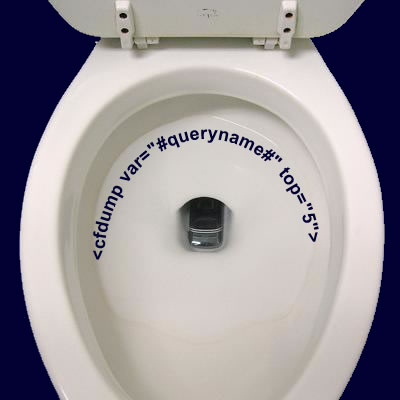
Har har. Scatological humor and programming.
So I learned something today that I didn’t know even though I have been using Coldfusion for years. It’s kind of embarrassing actually. Everyone has used cfdump a million times to debug query output. Sometimes a query might return many records though and you don’t really need to see them all. Apparently there is a “top” attribute you can use to limit the number of rows returned. Nice.
Dreamweaver Translator Error
I got a really weird error message today in Dreamweaver every time I tried to use the WYSIWYG view.
The following translators were not loaded due to errors: ASP.htm: has configuration information that is invalid.
Here’s how to fix it (Follow step 4).
Boot Camp + XP SP1 Disc = :-(
I do some .NET work on a project where the developers all use Visual Studio. A few weeks ago I foolishly tried to install it onto Virtual PC on my Powerbook G4. Total no-go. The installation took hours and the program locked up indefinitely the first time I tried to run it.
So, I took the plunge last week and decided to load XP onto the new family iMac using Boot Camp. A slight (deal breaker) problem arose though as I was preparing for installation. I was disappointed to discover that the XP cd that came with our PC was SP1 and therefore not compatible with Boot Camp.
A few minutes of googling, however, revealed a process known as “slipstreaming” whereby you can download SP2, merge it with your SP1 files and burn the result to a new cd that will work with Boot Camp. At first glance the process seemed pretty involved, but ultimately it proved fairly simple to follow. Here is where I found it.
I did it one snag though…
The ultimate goal of the process is a bootable XP cd. The result of my slipstreaming, however, produced 722 MB of files, which is just barely too large to burn to cd (Note: the size of your slipstream depends on how much extra crap came on your SP1 cd). So, what could be trimmed from my project? I deleted the SBSI folder, which in it’s own words is:
“Microsoft (r) Windows XP Professional Step by Step Interactive is a multimedia, self-paced training product that uses a combination of simulations and informative topics to create an easy and flexible learning environment.”
Problem solved. Sliptream cd installed XP like a charm to the iMac.